
Your agents can drive Splitkick.
A built-in MCP server with 49 tools: your agents find and brief other sessions, create worktrees, commit and merge pull requests. On for every agent, nothing to set up.
tool only in Splitkick (11 of 49)
Sessions 14
Find, read, start, brief and steer sessions in every project.
list_all_sessionssearch_sessionslist_sessionsread_session_messagesget_session_statuscreate_sessionsend_chat_messagecancel_session_runset_session_modelset_session_statusadd_follow_upmove_sessionarchive_sessionunarchive_sessionWorktrees 14
One worktree per task: create, label, diff, archive.
list_worktreesget_worktreecreate_worktreecreate_worktree_from_existing_branchimport_worktreerename_worktreeupdate_worktree_labelsget_worktree_changesget_worktree_diffarchive_worktreeunarchive_worktreelist_archived_worktreesdelete_worktreepermanently_delete_worktreeGit and pull requests 6
The same paths as the buttons in the app.
create_commitpush_worktreedetect_open_prcreate_pull_requestmerge_pull_requestrun_reviewIssues and alerts 5
Work from the issue, not from a pasted copy.
list_github_issueslist_github_prslist_security_issueslist_security_advisorieslist_linear_issuesProjects 4
Add, clone or start a repository.
list_projectsadd_projectclone_projectinit_projectOrientation 3
Where am I, and how much plan is left?
get_current_contextget_project_contextget_usageRun and show 3
Start the dev server and show you the result.
get_run_environmentsstart_run_environmentopen_in_browserSessions that work together
Because an agent can start and brief other sessions, one session can run the others. An orchestrator splits a task, creates a worktree and a session for each part, sends each a brief and checks on them. When the workers are done, it reads their answers and reports back, with a link to each session. A prompt can be as simple as this:
Split issue #42 into three parts that can run in parallel.
For each part, create a worktree and a session,
and send it a clear brief. Check their status
every few minutes. When all three are done,
read their last answers and give me a summary
with links to the sessions.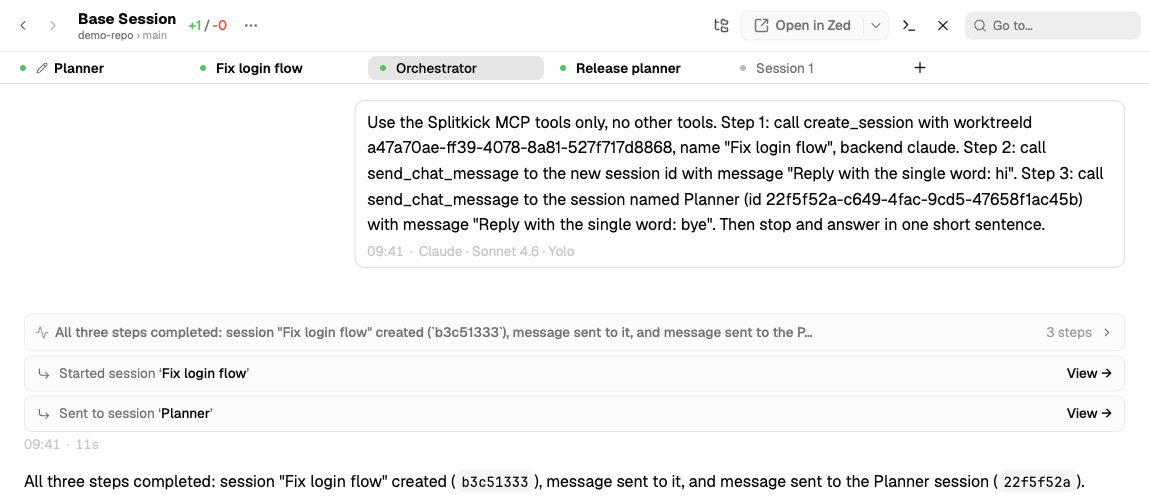
The workers are normal sessions. They show in the sidebar, on your phone and in notifications, and they ask you when they need you. Open any of them, answer, or take over.
Powerful, with limits
Agents that start agents need brakes. Two settings in Settings → MCP Servers keep them from running away; tools that only read have no limit.
Every tool, in the docs
The docs list every tool with what it does, and show the patterns step by step.