
Your AI coding agent forgets on a schedule
Claude Code and Gemini CLI delete sessions after 30 days by default. What you lose, and the settings and backups that keep your history.
Six weeks ago you and your agent spent an afternoon on a nasty bug. A race in the importer, two wrong theories, and one log line that gave it away. Today a similar bug shows up. You remember that session. You remember that the answer was in it. You open the history, and it is gone.
Your memory is fine here. The tool deleted the session, on schedule, and the schedule is in the docs.
The defaults
Here is what the agent CLIs do with your sessions out of the box.
| Tool | Default | What happens |
|---|---|---|
| Claude Code | 30 days | Transcripts and related files are deleted by a sweep (docs) |
| Gemini CLI | 30 days | Session cleanup is on by default, maxAge: "30d" (docs) |
| OpenCode | kept | The session picker showed only the last 30 days; the issue was closed “not planned” (#16733) |
| Codex | kept | No documented pruning; codex archive hides a session, codex delete removes it (reference) |
| Cursor | kept, but fragile | Local chats can turn invisible after a failed migration or a changed workspace id (forum) |
| GitHub Copilot CLI | synced | Sessions are uploaded to GitHub.com by default (GitHub Docs) |
Default retention, as each tool documents it.
Claude Code is the one most people use, so here are the details.
What Claude Code’s sweep takes
Claude Code deletes files older than cleanupPeriodDays. “The default is 30 days and the minimum is 1; setting 0 fails with a validation error.” (Claude Code docs) The sweep covers much more than the chat:
- the conversation transcript,
~/.claude/projects/<project>/<session>.jsonl - subagent transcripts
- large tool outputs and images returned by tools
file-history/, the snapshots behind checkpoint restoreplans/, the plan files from plan mode- the session’s scratchpad
The docs also list what you lose when transcripts go: “Resume, continue, and rewind for past sessions.” What stays is history.jsonl, which holds the prompts you typed. Your half of the conversation survives. The agent’s half, with its findings and tool results, does not.
There is one exception worth knowing about. Since v2.1.248, Claude Code keeps transcripts of sessions you started or last continued in Claude Desktop or Cowork at any age. Sessions in the terminal get no such exception.
Even within the 30 days, sessions can be hard to find. claude --resume lists sessions from the current folder. Sessions from other folders are hidden until you press Ctrl+A or know the id (sessions docs).
Why your session history is a knowledge base
Git records what changed. It rarely records why. The why is in the session:
- Decisions and their reasons. “We keep the old endpoint because the iOS app from March still calls it.”
- Dead ends. The two theories that were wrong, and how you ruled them out. Without them, the next agent tries them again, on your tokens.
- Commands that worked. The exact migration flag, the curl call with the right header, the one test that reproduces the bug.
- What the agent found. File paths, line numbers, the log line. This is the expensive part of a session, and it is the part the sweep deletes.
A good commit message holds one or two of these. A session holds all of them. And once the history is kept, agents can search it too, so you stop pasting the same background into every new session.
How to keep it
All of this is practical, and most of it takes five minutes.
1. Change Claude Code’s setting
Set cleanupPeriodDays to a large number in ~/.claude/settings.json. Since 0 is rejected, “keep” means “a very long time”:
{
  "cleanupPeriodDays": 36500
}
To change it without touching your other settings, I use jq and keep a copy of the old file (create the file with {} first if it does not exist):
cp ~/.claude/settings.json ~/.claude/settings.json.bak
jq '.cleanupPeriodDays = 36500' ~/.claude/settings.json.bak > ~/.claude/settings.json
Two things to know. If your company deploys managed settings with cleanupPeriodDays, that value wins over yours. And transcripts are plaintext. The docs warn that anything a tool reads, including a .env file, can end up in a transcript. Keeping them longer means keeping that longer too, so protect the folder and its backups.
2. Change Gemini CLI’s setting
In Gemini CLI’s settings.json, turn the cleanup off:
{
  "general": {
    "sessionRetention": {
      "enabled": false
    }
  }
}
You can also keep it on and set a longer maxAge or a maxCount instead (docs).
3. Know how the others hide things
OpenCode keeps everything. opencode session list lists your sessions, and opencode export exports one (CLI docs). In Codex, archived sessions are hidden and only codex delete removes them. With Cursor, back up before you reinstall, migrate or sign in again.
4. Back up the raw files
A setting protects you from the sweep. It does not protect you from a dead disk, a reinstall or a bad update. Copy the folders somewhere else on a schedule. A plain rsync without --delete works, because then a file deleted at the source stays in the backup:
rsync -a ~/.claude/projects/ /Volumes/Backup/agent-history/claude/
rsync -a ~/.gemini/tmp/ /Volumes/Backup/agent-history/gemini/
To run it every night, add it to your crontab (crontab -e):
0 3 * * * rsync -a ~/.claude/projects/ /Volumes/Backup/agent-history/claude/Back up the raw files. Do not count on a converter. Anthropic’s docs say the transcript format is internal and changes between versions, so a script that turns transcripts into Markdown can stop working on any update. Raw files can always be read again later. And because transcripts can contain secrets, the backup target should be encrypted.
5. Search before you ask again
Before you explain a problem to a fresh session, look for the old one. In Claude Code, claude --resume and then Ctrl+A shows sessions from every folder. Better still, keep your history somewhere that has search across all projects.
How Splitkick keeps its own copy
This is where I talk about my own product. I build Splitkick, a free, open-source Mac app that runs agent CLIs side by side, one git worktree per task. Keeping history is one of the things it is built around.
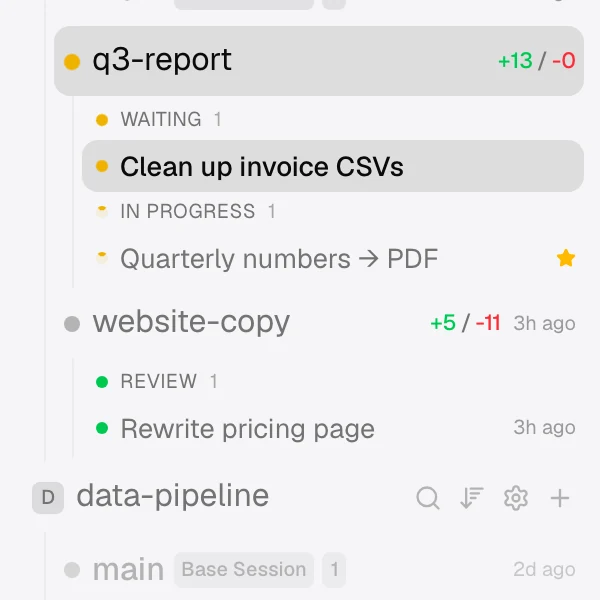
Splitkick writes every session into its own folder on your disk: ~/Library/Application Support/app.splitkick.desktop/sessions/data/<session id>/, with the session’s metadata, conversation and run history (Files on disk). Writes are atomic, so a crash does not leave a half-written file. Splitkick has no database and no account.
- Nothing expires by default. Closing a session archives it. On a new install, archived items stay for ever. If you want a limit, it is in Settings → General → Auto-delete archives (Archived items).
- A backup that never deletes. Settings → General → Session backup copies your session data into a synced folder, for example iCloud Drive, Syncthing or Nextcloud. After the first run it copies only new and changed files. The docs give about 136 MB per day for normal use on one Mac. A session you delete on your Mac stays in the backup (Session backup).
- Search across projects and devices. ⌘K searches names and messages in every project. With a backup set up, the Other devices tab searches the sessions of your other machines.
- Agents can search too. The built-in MCP server has a
search_sessionstool, so an agent can find earlier work on the same topic before it starts (MCP server).
Two honest notes. First, each agent CLI keeps its own data in its own place, for example ~/.claude, and Splitkick does not copy it. Splitkick’s record is its own. If you also want to resume a months-old conversation inside the Claude Code CLI itself, set cleanupPeriodDays as shown above. Second, Splitkick stores your history on your disk, but the agents still send your prompts and the files they read to their model providers. What the model sees is up to the agent and its provider.
If you want the longer list, with chat apps like ChatGPT and Claude.ai, I wrote it up in October: Your AI app is your second brain. It has Alzheimer’s.
Do this today
- Set
cleanupPeriodDaysin~/.claude/settings.json. - Turn off or extend Gemini CLI’s
sessionRetentionif you use it. - Put
~/.claude/projects/and your other agent folders into an encrypted backup. - Try Splitkick if you want history, search and backup handled in one place: splitkick.app/download.
If you find this useful, a star on GitHub helps other people find the project.
Andreas Zeitler builds Splitkick at Planetfall Software in Regensburg.